Choose the time you need. Keep the plan you built.
Start free, or choose a one-time Home Project or Planner Plus Pass for 30, 60 or 90 days. No subscription and no automatic renewal.
✓ One-time payment✓ Prices in AUD✓ Secure checkout by Stripe
Choose your access
Measure the home. Save the layout. Plan with real products.
Every paid duration contains the same features and saved-project limits for its plan. Longer Passes simply give you more time at a lower effective price.
to start
Free
Sign in for 5 floor-plan recognitions per day and one saved cloud project.
A$0to start
Floor-plan cleanup and adjustable area estimate
Automatic outline and room dimensions with manual corrections
Scale, reference lines, measurements and basic furniture planning
Save 1 cloud project and continue editing across devices
Start planning free →Registered, signed-in accounts can recognise 5 floor plans per day, resetting at 00:00 UTC. Save 1 project with 1 layout; no archive. Delete the saved project before saving another. Unsaved work can be replaced when you start a new plan.
For one home project
Home Project
Check the space around selected furniture, save your layout and continue on another device.
A$24/ 60 daysA$20.40 with LAUNCH15 if eligible
10 complete cloud projects
See how much space is left around a selected item
Reopen your floor plan without uploading it again
Keep area estimates and measurements without starting over
Continue adjusting your saved furniture layout and notes
One-time payment · Access starts after successful payment
Plan with real products
Planner Plus
Import the furniture you want to buy, save it for reuse and check clearance across the whole layout.
A$39/ 60 daysA$33.15 with LAUNCH15 if eligible
Full-layout clearance in Space Designer
Edit each space separately and keep up to 20 furniture designs per space
Import product details and dimensions from supported retailer links · 30 imports per rolling 30 days
Save and reuse up to 100 real or custom items in My furniture
20 saved floor-plan projects
10 saved workspace projects
Everything included in Home Project
One-time payment · Access starts after successful payment
Inside FloorSQ
Picture what you could plan.
A complete layout, a closer look at the gaps, and the controls for refining it.
Picture the possibilities
A little planning. More room to live.
Bring your room ideas into focus: furniture that works together, a place to unwind and space to move comfortably.
Try a layout before moving day
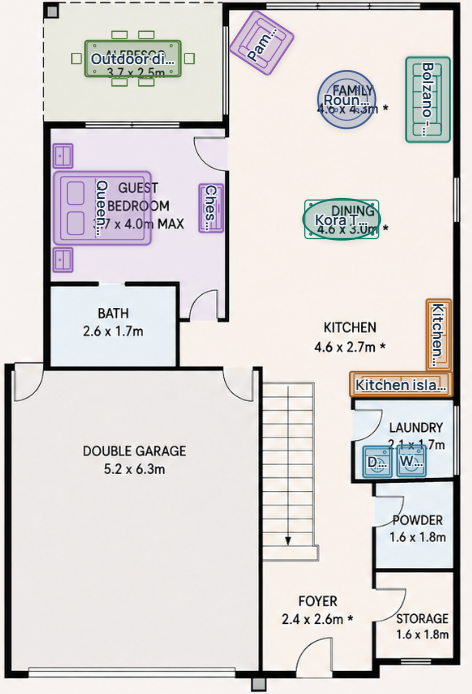
Arrange the bedroom, living area and dining space on one plan.
Zoom in on everyday movement
Compare the space beside a wardrobe and between the sofa and table.
Set the scale, then start planning
Reference lines, rulers and furniture tools keep the planning steps together.
Product screenshots from FloorSQ demonstrations. Layouts and measurements are examples; check the scale and dimensions of your own plan. Features and limits depend on your plan. See the plan comparison for what is included.
Compare plans
What is included today
Home Project saves your layouts and checks clearance around selected furniture. Planner Plus adds product-link imports, a reusable personal furniture library and clearance across the whole layout in Space Designer. Check the plan scale and imported product dimensions before relying on the gaps.
Feature
Free
Home Project
Planner Plus
Daily recognition after sign-in
5
Unlimited
Unlimited
Floor-plan cleanup and adjustable area estimate
✓
✓
✓
Outline, dimensions, manual correction and furniture trial
✓
✓
✓
Save your plan, measurements and furniture layout
✓
✓
✓
Continue editing across devices
✓
✓
✓
Saved floor-plan projects
1
10
20
Saved workspace projects
0
0
10
Space Designer
—
—
✓
Furniture clearance checks
—
Selected furniture
Full layout
Save and reuse real products in My furniture
—
—
100 items
Edit individual spaces and keep alternative designs
—
—
20 designs per space
Product-link imports per rolling 30 days
0
0
30
Your layout, ready to revisit
Save your layout. Pick up where you left off.
Save your project to keep the floor plan, area estimates, measurements, furniture layout and notes together. Reopen it to continue adjusting the room, even from another device after signing in.
A Space Designer layout with furniture and storage arranged on the original floor plan.
Already have a Pass?
Add 30 more days at the renewal price
Renewal Passes apply only to the same plan and are available from 7 days before expiry until 7 days after expiry. Eligibility is confirmed securely before checkout.
Home Project
Home Project 30-Day Renewal Pass
A$12 / 30 days
Planner Plus
Planner Plus 30-Day Renewal Pass
A$20 / 30 days
Renewing early adds 30 days to the current expiry date. After expiry, the new period starts when payment succeeds. Renewal Passes are one-time purchases, do not renew automatically and cannot use LAUNCH15.
Before you pay
A clear one-time purchase
01
No automatic renewal
You will never be charged for another period unless you choose and confirm another Pass.
02
The clock starts after payment
The selected 30, 60 or 90 days begin when Stripe reports the payment as successful.
03
Expiry does not mean a surprise charge
Paid tools and cloud-project access stop at expiry. Saved data is handled under the Privacy Policy and applicable retention rules.
04
Check before buying
Verify room measurements, product dimensions and the space needed to move, open doors and use storage.
Prices are in Australian dollars. Stripe shows the final total and any applicable tax before payment.
Essential browser storage keeps the service and your privacy choice working. With your permission, Google Analytics helps us understand page use and improve FloorSQ. Advertising storage remains disabled.